Build on the Python API
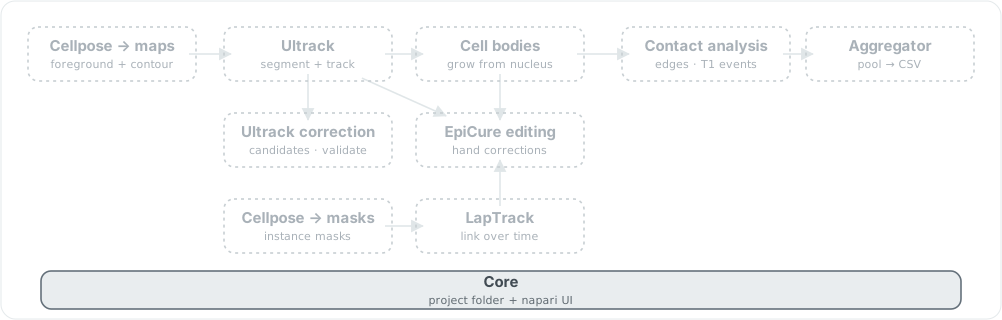
itasc-core is the shared substrate every other distribution is built on: the file conventions that make a project folder a source of truth, and the napari UI primitives the stage widgets are assembled from. Solid chip is shipped; dashed are the rest of the family.
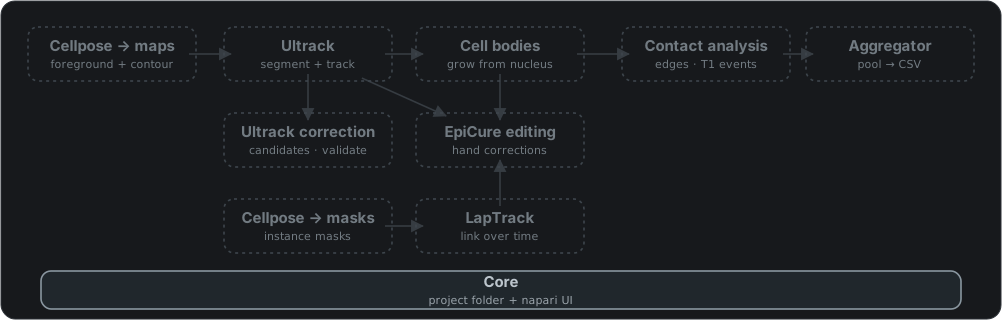
itasc-core is the shared substrate every other distribution is built on: the file conventions that make a project folder a source of truth, and the napari UI primitives the stage widgets are assembled from. Solid chip is shipped; dashed are the rest of the family.
itasc-core is the shared substrate every ITASC distribution is built on: the
file conventions that make a project folder a source of truth, and the napari UI
primitives the stage widgets are assembled from. Install it on its own only to
script against those conventions from your own Python; each stage tool pulls it
in for you.
One idea runs through it: a run’s state lives in files on disk, not in memory.
Each stage writes tracked labels to its folder, a commit promotes them to a
stable name, and the difference between the working file and the committed one
is the status a widget shows. itasc-core is where that contract is written
down, so code that reads or writes an ITASC project agrees with the apps by
construction.
What it provides
Two layers, both under the itasc.* namespace:
itasc.coreis the file and array conventions. Tracked labels are a(T, Y, X)uint32stack read and written whole (label_store); a stage output is promoted from its working folder to a committed name and its state read back (commit); a tracked stack collapses into the per-track frame ranges the lineage panel draws (lineage); plus TIFF, path, and logging helpers (tiff,paths,logging).itasc.napariis the reusable UI layer the widgets share: the import gate that keeps heavy dependencies lazy (ui_gate), the house style (ui_style), and the flow layout and widget helpers (widgets,_flow_layout,_widget_helpers).
Read and write a project the way the apps do
Tracked labels round-trip as a single stack, so a script sees exactly what a widget committed:
import numpy as np
from itasc.core.label_store import write_full_tracked_stack, read_full_tracked_stack

labels = np.zeros((10, 512, 512), dtype=np.uint32)   # (T, Y, X)
write_full_tracked_stack("pos00/2_nucleus/tracked.tif", labels)
back = read_full_tracked_stack("pos00/2_nucleus/tracked.tif")
A commit promotes a working file to the stable name discovery looks for, and
commit_state reports where a position sits: the same four states the catalog
status rail draws, a hollow dot for missing, amber for uncommitted, green for
committed, red for stale.
from itasc.core.commit import promote_labels, commit_state

promote_labels("pos00/2_nucleus/tracked.tif", "pos00/nucleus_labels.tif")
commit_state("pos00/2_nucleus/tracked.tif", "pos00/nucleus_labels.tif")
# -> "missing" | "uncommitted" | "committed" | "stale"
build_lineage turns a tracked stack into per-track frame ranges, so a gap in a
track, a vanish-and-return that is the signature of a missed link, reads as a
break between segments:
from itasc.core.lineage import build_lineage

model = build_lineage(labels)      # LineageModel
lane = model.lane_for(cell_id=7)
lane.has_gap                       # True if track 7 disappears then returns
Install
uv add itasc-core
Or pip install itasc-core into an existing environment. It is a small,
pure-Python dependency: the scientific stack and napari arrive with whichever
stage tool you install, not with this.
Where it fits
itasc-core is the bottom of the stack, not an app: it has no widget of its own
and nothing to open from the Plugins menu. To run a stage, install its
distribution. The
distribution overview maps
each entry point to its tool.